Billing
Manage your subscription, payment methods, and invoices from the Subscription settings.
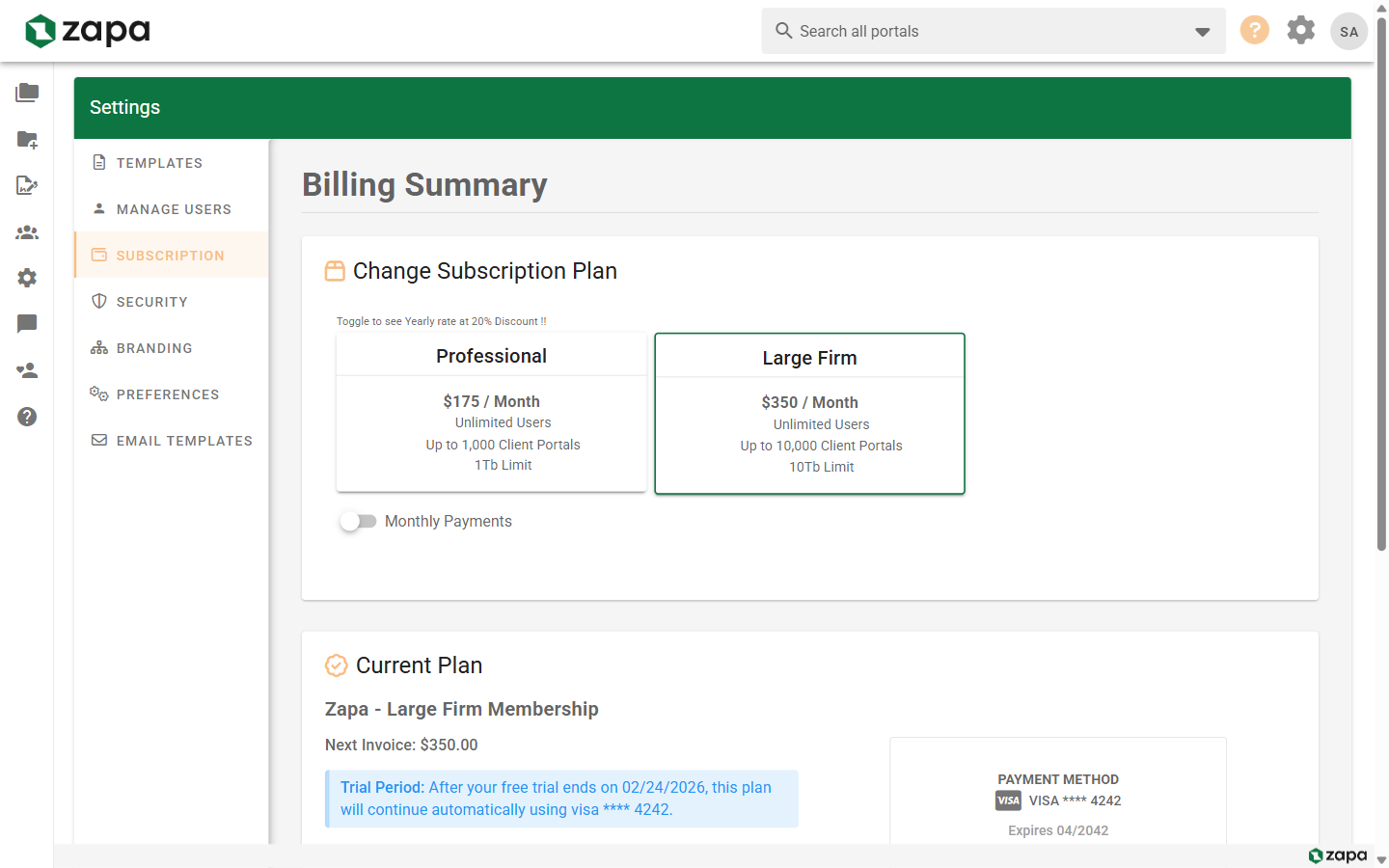
Accessing Billing
- Go to Settings
- Click the Subscription tab
Only admins can access billing settings.
Subscription Overview
Your subscription page shows:
- Current Plan - Your tier (Professional, Large Firm, Enterprise)
- Billing Period - Monthly or annual
- Next Billing Date - When you'll be charged
- Payment Method - Card on file
- Usage - Portals, storage, etc.
Subscription Plans
| Plan | Monthly | Annual (Save 20%) |
|---|---|---|
| Professional | $175/month | $140/month ($1,680/year) |
| Large Firm | $350/month | $280/month ($3,360/year) |
| Enterprise | Contact us for pricing | Contact us for pricing |
See Feature Comparison for detailed tier differences.
Changing Your Plan
Upgrading
To upgrade to a higher tier:
- Click Change Plan
- Select your new tier
- Review the changes
- Confirm upgrade
Upgrade billing:
- Takes effect immediately
- Prorated credit for current period
- New rate charged immediately
Downgrading
To downgrade to a lower tier:
- Ensure you're within new tier limits
- Click Change Plan
- Select the lower tier
- Review impact
- Confirm downgrade
Downgrade billing:
- Takes effect at next billing date
- Full access until then
- No partial refunds
Checking Limits Before Downgrade
Before downgrading, verify:
- Portal count within new limits
- Storage usage within new limits
- Features you'll lose
The system warns you if limits are exceeded.
Billing Period
Monthly Billing
- Charged on the same date each month
- Easy to cancel or change
- Slightly higher per-month cost
Annual Billing
- Charged once per year
- 20% savings vs. monthly
- Locked in for 12 months
Switching Periods
Monthly to Annual:
- Click Switch to Annual
- See your savings
- Pay the annual amount
- Annual billing begins
Annual to Monthly:
- Happens at renewal
- Contact support to change mid-term
Payment Methods
Viewing Payment Method
Your current card shows:
- Last 4 digits
- Expiration date
- Card brand (Visa, Mastercard, etc.)
Updating Payment Method
- Click Update Payment Method
- Enter new card details
- Verify the card
- Save
The new card is charged for future invoices.
Failed Payments
If a payment fails:
- You receive email notification
- We retry automatically
- Update your card to resolve
- Access may be limited after grace period
Invoices
Viewing Invoices
- Scroll to Billing History
- See list of all invoices
- Click an invoice to view details
Downloading Invoices
- Find the invoice
- Click Download or PDF icon
- Invoice downloads as PDF
Invoice Details
Each invoice shows:
- Invoice number
- Billing period
- Plan and amount
- Tax (if applicable)
- Payment status
Usage and Limits
Current Usage
View your current usage:
| Metric | Your Usage | Limit |
|---|---|---|
| Active Portals | 156 | 1,000 |
| Storage | 45 GB | 1 TB |
| Team Members | 8 | Unlimited |
Approaching Limits
When approaching limits:
- Dashboard shows warning
- Email notification sent
- Consider upgrading
Exceeding Limits
If you exceed limits:
- New portals may be blocked
- Uploads may fail
- Upgrade required to continue
Cancellation
Canceling Your Subscription
- Click Cancel Subscription
- Provide feedback (optional)
- Review what happens
- Confirm cancellation
What Happens When You Cancel
- Access continues until period end
- Data retained for 30 days
- After 30 days, data may be deleted
- Resubscribe to restore access
Reactivating After Cancellation
Within 30 days:
- Sign in to your account
- Go to Settings → Subscription
- Click Reactivate
- Choose a plan
- Data is restored
Enterprise Billing
Enterprise plans have custom billing:
- Custom pricing
- Custom terms
- Invoice billing available
- Dedicated support
Contact sales for Enterprise pricing.
Tax Information
Tax ID / VAT
To add your tax ID:
- Find Tax Information
- Enter your tax ID or VAT number
- Save
Tax ID appears on invoices.
Tax Exemption
If tax-exempt:
- Contact support
- Provide exemption documentation
- We'll update your account
Receipts
Email Receipts
Receipts are emailed to the billing contact after each charge.
Changing Receipt Email
- Find Billing Email
- Enter the email for receipts
- Save
Troubleshooting
Payment Declined
- Check card details are correct
- Verify sufficient funds
- Contact your bank
- Try a different card
Wrong Amount Charged
- Review invoice details
- Check for prorations or credits
- Contact support if incorrect
Can't Access After Payment
- Allow time for processing (up to 1 hour)
- Sign out and back in
- Clear browser cache
- Contact support
Missing Invoice
- Check spam folder
- Verify billing email
- Download from Settings → Subscription
- Contact support
Related Topics
- Feature Comparison - Tier details
- Team Management - User management
- Branding - Custom branding options